Treasure · Expense tracker for Android. Know where your money goes.
Track income and expenses in a few taps, approve drafts made from your bank alerts, and see every month in clear reports. Free to install on Google Play.
From bank alert to report, without typing.
Scroll to follow one payment through the app. The screens below use sample data.
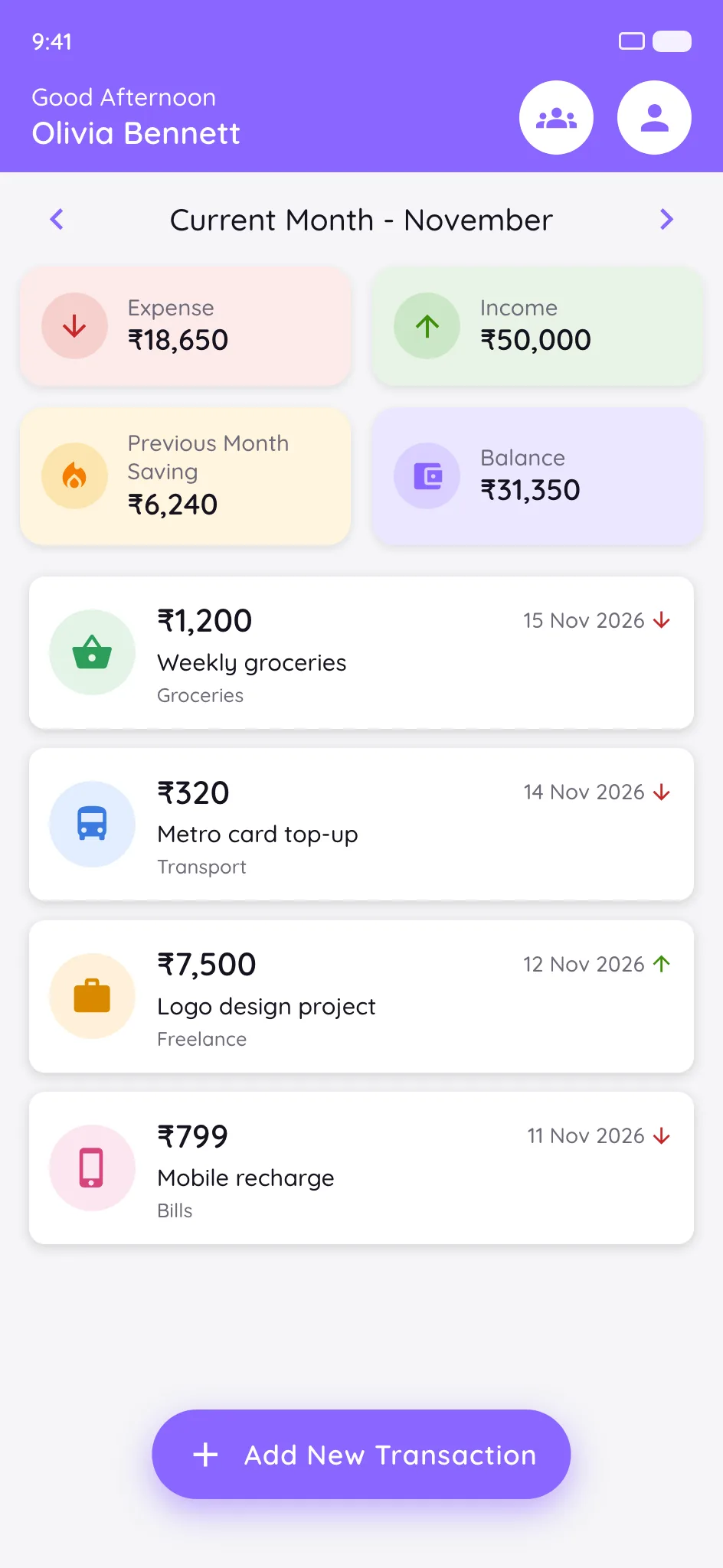
Your whole month, on one screen.
Income, expense, last month's saving and your balance sit at the top of Home. Open the app and you know where you stand.
- Income and expense for the month
- Previous month's saving
- Your current balance
A bank alert becomes a draft.
Turn on auto-fill and Treasure reads the bank alert and prepares the entry for you. It is optional, and you can switch it off anytime.
- Amount, payee and date filled in for you
- Stays a draft until you decide
- Optional, and off whenever you want
Tap Approve. It is saved.
Approve it, edit it or reject it. Once approved, your expense and balance update on the spot.
- Approve, Edit or Reject on the card
- Expense and balance update right away
See the month by category.
Reports turn your saved transactions into income, expense and net, with a chart for each category.
- Income, expense and net for the month
- A chart broken down by category
Tap Year to zoom out.
Switch between month and year to see totals and how much each category adds up to.
- Month and Year tabs at the top
- Category totals for the whole year
Simple tools. Clearer decisions.
Five tools that do one job: show you what came in, what went out and what is left.
Transactions
Record income and expenses with date, amount, remark and category.
Reports
Summaries, trends and statistics for the year or the month.
Categories
Group your spending so patterns become obvious.
Reminders & auto-fill
Optional expense reminders and auto-fill from bank alerts. Turn them off anytime in Manage permissions.
Auction committees
Create a committee and add members with contact details. Members can view it in the app.
Pocket money or first salary.
Make your monthly pocket money last longer.
Track what you receive, see where you spend it and know what you have left.
Your first salary needs a plan.
From groceries to recurring bills and impulse buys, understand your month before it gets away from you.
Your data is yours.
We do not sell your personal or financial information for marketing. Data is stored on secure infrastructure, including Google Firebase, and optional features can be turned off anytime.
Guides for your money
Short reads on student budgets, first salary and tracking expenses on Android.
Expense tracker app for students in India
Find an expense tracker app for students in India: track pocket money, UPI spends, and what is left this month—with a simple Android workflow.
How to manage pocket money as a student
Learn how to manage pocket money as a student: record what arrives, cap small UPI leaks, and check what is left before the month is over.
How to budget your first salary in India
How to budget your first salary in India: track in-hand income, split needs vs wants, and see the month before lifestyle fills the new number.
How to know where your money goes each month
How to know where your money goes each month: record income and expenses, use categories, and check remaining balance while you can still change it.
Frequently asked questions
Is Treasure free?
Treasure is free to download on Google Play. You can start tracking income and expenses with the core money-management features without a paid subscription.
Is Treasure available on Android?
Yes. Treasure is available for Android on Google Play.
Who is Treasure for?
Treasure is for people who want a simple way to manage money—especially students with limited pocket money and young professionals starting their salary journey. Auction committee management is available as an additional capability.
Can I track income and expenses?
Yes. You can record income and expense transactions with date, amount, remark, and category.
Can I view reports and insights?
Yes. Treasure includes reports and category breakdowns so you can see income, expenses, and where your money goes over time.
Is my financial data private?
We do not sell your personal or financial information for marketing. Data is stored using secure infrastructure (including Google Firebase). Optional features like expense reminders and auto-fill from bank alerts stay under your control and can be turned off anytime. See our Privacy Policy for details.
What is the Auction Committee feature?
Auction committees are an additional capability in Treasure. You can create a committee, add members with contact details, and members added to a committee can view it in the app.